

Beginner's Guide to Learning HTML
in this article we are going to cover the basic and fundamental of the core and the structure of the browser language. which is the foundation of modern UI over the internet.
Structure of the Browser
Before design the interior and exterior of the house. we need to build the skeleton structure of the house similarly concept applies on the browser before designing we need a structure or skeleton of the web page.
HTML stand for the hyper text markup language. HTML is the building block of the web page and It defines the structure and layout of web pages by using a system of tags and elements to organize text, images, links, and other media. It was created by Sir Tim Berners-Lee in the early 1990s at CERN and has evolved significantly, with HTML5 being the latest major version, introducing semantic elements and support for multimedia.
HyperText refers to the ability to link to other pages or sections via clickable links. Markup Language means it uses tags to annotate text and define its structure and meaning.
HTML Tags
HTML is written inside the tag which has the significant mean to the browser. In which some of tags require pair of open-close tag and some them are self closing tags.
Tags like para, header, nav etc… are the example of the open-closing tag where as br, hr, img etc… are the example of the self closing tags.
Between the pair of the open-closing tag we provide our content which provide context of the web page to the client.
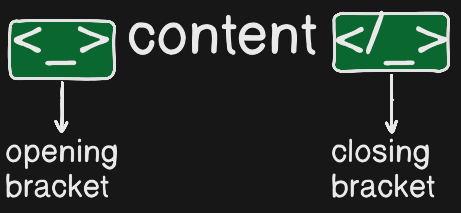
At the “_“ place of this always wrote the tags symbol that we want to use. the tag name are as follows:-
h1 - the use case of this tag is to represent the heading in the larger and bold so that user go the idea that this is a heading of the web page
p:- the use case of this tag is to represent the content of the web page in the normal font size and content is readable
div:- this tag is like a box on the web page. it serve the flexibility in designing the web page and as a container for other
span:- It is an inline element which is more flexible and mostly used in font styling
Inline V/s Block element
Block elements start on a new line, take up the full width of their container, and create a "block" of content. Inline elements do not start on a new line, only take up as much width as needed, and flow within text.
Line Breaks: Block elements start on a new line; inline elements do not.
Width: Block elements stretch to full width; inline elements only take up necessary space.
Margins: Block elements support top and bottom margins; inline elements do not.
Containment: Block elements can contain inline elements and other block elements; inline elements can only contain text or other inline elements.
Self Closing tag
Self-closing tags in HTML are elements that do not require a separate closing tag because they are inherently empty and cannot contain content or child elements. these tag are also known as void tag
tag like img, br, hr, input, link etc…
Commonly used HTML tags
<html>: The root element of an HTML document, wrapping all content.<head>: Contains metadata like the page title, character set, and links to stylesheets or scripts.<title>: Sets the title of the web page, displayed in the browser tab.<body>: Contains all visible content on the page, such as text, images, and interactive elements.
Content and Layout Tags
<h1>to<h6>: Define headings, with<h1>being the most important (main title) and<h6>the least.<p>: Represents a paragraph of text.<div>: A block-level container used to group and style sections of content.<span>: An inline container for styling or scripting specific parts of text.<br>: Inserts a line break without starting a new paragraph.<hr>: Creates a thematic break or horizontal rule.
Text Formatting and Emphasis
<strong>: Indicates strong importance (typically rendered in bold).<em>: Applies emphasis (typically rendered in italics).<code>: Displays inline computer code.<pre>: Preserves whitespace and line breaks for preformatted text.<blockquote>: Used for long quotations from external sources.
Links, Images, and Media
<a>: Creates hyperlinks to other pages, files, or locations. Requires thehrefattribute.<img>: Embeds images using thesrcandaltattributes.<audio>: Embeds audio content.<video>: Embeds video content.
Lists and Tables
<ul>: Defines an unordered (bulleted) list.<ol>: Defines an ordered (numbered) list.<li>: Represents a list item within<ul>or<ol>.<table>: Creates a data table.<tr>: Defines a table row.<th>: Defines a table header cell.<td>: Defines a standard table data cell.
Forms and User Interaction
<form>: Encloses form elements for user input.<input>: Creates various input fields (text, password, checkbox, etc.).<button>: Defines a clickable button.<label>: Associates a label with a form control.


