

Understanding How Your Browser Works Internally
In this article we are in the depth of the how browser work internally and how html, css together build the document object model. Did you ever wonder what happen when you enter URL and hit enter. if now this article explain the under hood engineering of the browser.
Browser
The web browser is software which help in fetching the resources from sever to the system of the user like video stream, download resources, chatting etc..
Browser Architecture
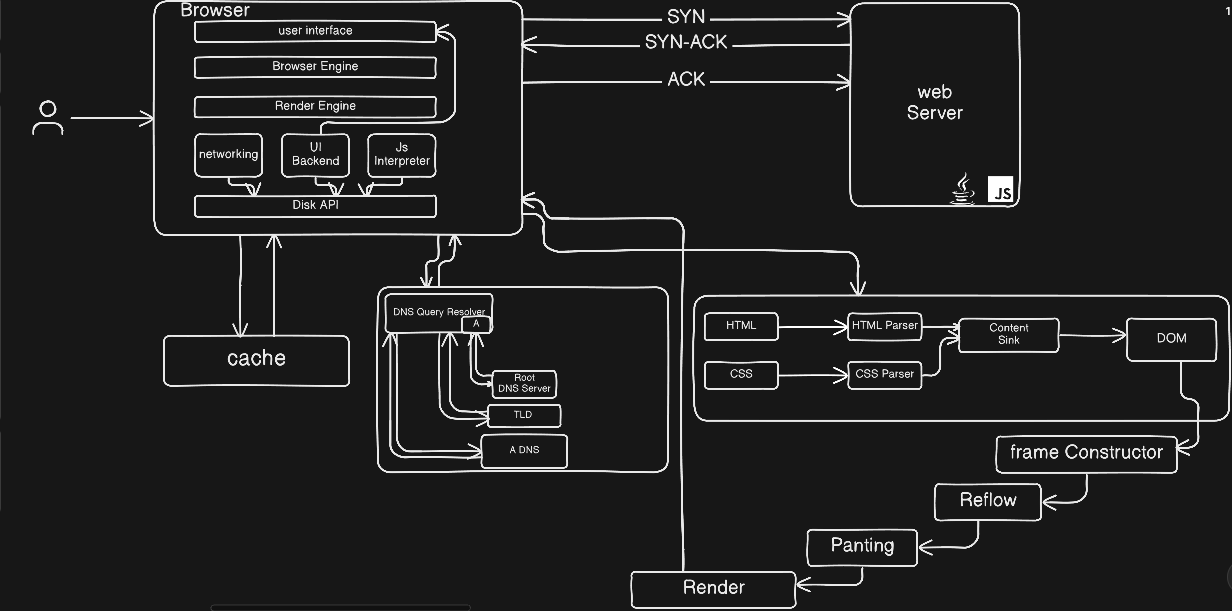
Browser Working
Well the answer of all the above questions lies in this particular example. when user enter URL and hit enter the browser scan/search the ip address into the cache which is a part of the Disk API. when cache does not contain the ip address of the URL the request first move to the DNS server which help in getting the ip address of the URL. Then browser send a request to the web server of the particular URL for communication establishment. In response the server send response along with acknowledgement. This process is handled by the Networking.
The server contain file like HTML, CSS, JS etc.. These file are fetched by the browser and Render Engine help in the parsing of the HTML and CSS file. both file parsed by there respected parser inside the browser which goes to Content Sink which help in form the document object model(DOM) tree like structure which is representation of the HTML and CSS file inside the browser. the functionality of the content sink is to combine the html along with it css inside the browser.
JS file is compiled by the JS interpreter and inject the functionality inside the component of the browser managed by the Browser Engine. which help in the co-ordination of the render engine and the functionality. Javascript is compiled by engines like spiderMonkey, v8 engines
User Interface help in display all the component which is displayed on user’s system screen and it functionality is managed by the UI backend.


